

Acheter un interrupteur d'automatisation domestique n'est pas simplement acheter un interrupteur lumineux. Pour un interrupteur lumineux, tout ce que vous devez choisir est la couleur et combien de groupes vous souhaitez. Pour un interrupteur d'automatisation, presque rien n'est aussi simple car vous devez également sélectionner un protocole, un système de hub, si le câblage présent doit être pris pour acquis, et plusieurs autres évaluations. Cela signifie que trois des quatre décisions sont effectivement permanentes après l'installation de l'interrupteur, ce qui vous oblige à tout remplacer lorsque vous passez à un autre écosystème si le protocole est incorrect ou si vous ne pouvez pas installer l'interrupteur si le neutre est incorrect.
En résumé, pour les nouvelles installations en 2026, choisissez Matter pour sa flexibilité, Zigbee lorsque vous optez pour le plus grand réseau au prix le plus bas, ou Wi-Fi si vous avez besoin d'une configuration avec 15 appareils ou moins et prévoyez de sauter un hub. Le coût des interrupteurs à courant filaire, marche/arrêt, se situe dans la fourchette de $20 à $45, tandis que les variateurs peuvent être obtenus pour $35 à $65, et les contrôleurs de scène peuvent coûter entre $45 et $90. Presque tous nécessitent un câblage neutre pour fonctionner, bien que des modèles non neutres soient disponibles mais plus chers et pas entièrement sans problème quant à leur utilisation.
La catégorie comprend tout ce qui peut remplacer un interrupteur mural traditionnel, est alimenté par le réseau électrique, et reçoit des instructions qui ne nécessitent pas l'utilisation des doigts. Pratiquement, elle englobe quatre groupes de produits :
La distinction la plus importante pour les acheteurs est entre les dispositifs qui peuvent commuter la charge et ceux qui envoient uniquement des commandes. Un clavier de scène n'a rien à voir avec la charge (il nécessite seulement l'électricité et le hub approprié). C'est ainsi que les gens se retrouvent confus et finissent avec un variateur câblé à une boucle d'éclairage qui ne peut pas atténuer la charge.
Ce qui sépare cette catégorie des ampoules intelligentes est également important. Au moment où l'interrupteur mural est éteint, l'ampoule intelligente est considérée comme idiote. Au contraire, l'interrupteur intelligent est intégré au mur et continue de contrôler les lampes idiotes, de sorte que tous les membres de la famille ont la possibilité de l'utiliser pendant que l'automatisation continue de fonctionner. Les compromis entre les deux approches sont exposés dans cette comparaison de comment les interrupteurs intelligents diffèrent des interrupteurs ordinaires en pratique, et les implications en matière de câblage et de comportement domestique sont la partie que la plupart des acheteurs sous-estiment.
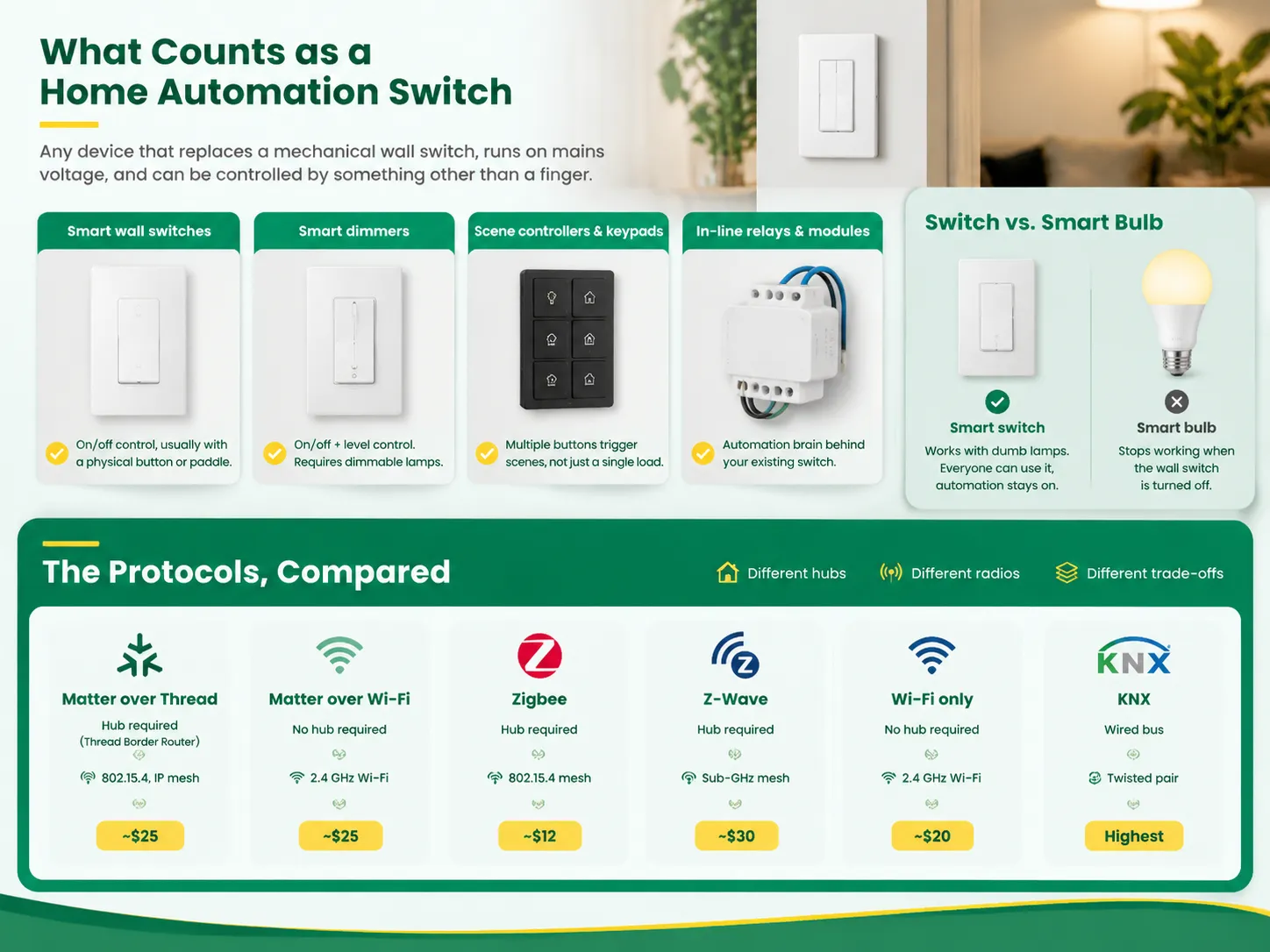
C'est la décision qui fixe le ton pour tout ce qui se passe ensuite, car elle détermine quels hubs vous avez besoin, avec quels autres interrupteurs ils peuvent communiquer, et combien coûte le réseau à mesure qu'il s'étend.
| La lumière se connecte soit à son propre réseau Wi-Fi spécifique, soit à un réseau Zigbee/BLE. Un signal est envoyé de l'application au pilote numérique à l'intérieur de l'ampoule afin d'ajuster sa luminosité. Ainsi, tout ce que vous avez à faire est d'allumer votre interrupteur et de contrôler le niveau de luminosité depuis votre téléphone. | Hub requis | Radio | Sélection de dispositifs | Coût approximatif par dispositif | Idéal pour |
|---|---|---|---|---|---|
| Matter sur Thread | Routeur de frontière Thread | 15.4, maillage basé sur IP | Croissance rapide | ~$25 | Nouvelles installations, maisons multi-plateformes |
| Matter sur Wi-Fi | Non | Wi-Fi 2,4 GHz | Croissance rapide | ~$25 | Configurations simples, un écosystème |
| Zigbee | Oui | Maillage 802.15.4 | Plus de 3 000 dispositifs | ~$12 | Grands réseaux, écosystèmes existants |
| Z-Wave | Oui | Maillage Sub-GHz | Plus de 500 dispositifs | ~$30 | Wi-Fi encombré, longue portée, dispositifs de sécurité |
| Wi-Fi uniquement | Non | Wi-Fi 2,4 GHz | Très large | ~$20 | Moins de 15 dispositifs, simplicité |
| KNX | Wired bus | Twisted pair | 8,000+ certified products | Highest | New-build and commercial projects |
Matter is the standard supported cooperatively by Apple, Google, Amazon, and Samsung, and practically every new smart device will be built around it in 2026. A Matter-compliant device works independently of any specific vendor’s procedures and will function on your network without going through a server. However, it requires some equipment to be set up: Matter will function only with Thread and needs a Thread Border Router, which, fortunately. Most homes have such routers hidden in Apple’s 4K TV, HomePod mini, Nest Hub, Echo (at least 4th generation), or Wi-Fi 6E router. Matter over Wi-Fi is free from the router requirement but suffers from Wi-Fi limitations in terms of safety and the number of supported devices.
Zigbee is the best option in this aspect. It has a 20-year head start and has over 3,000 products in the market at a price that is half of what a Matter device costs. Zigbee is a self-healing mesh that has an extremely low latency. Zigbee comes with its limitations: it talks only to its hub that makes it difficult to switch to the other technology without rebuilding the network. So for those who already possess a Hue, SmartThings, or Aqara hub, it would be the best way to go Zigbee for their next sensors/switches.
Z-wave works in the sub-GHz band with a very high frequency and is not required to compete with Wi-Fi in terms of frequency and range. The system’s range is about 30-100 meters per hop, which makes it penetrate brick and wood more efficiently than 2.4 GHz. On the other hand, Z-Wave is the most expensive among the alternatives, so a few consumers cannot afford to buy it. Also, although the company supports 232 devices, it has very low penetration and forces the consumers to spend more money and buy more products that are incompatible with the European systems.
Wi-Fi does not require any additional hubs that make it accessible to users. It has its weaknesses: the average receiving station can easily handle 30-50 concurrently operating devices and fails at the larger numbers of connections. Protocols can coexist in one home, and the underlying architecture that makes a multi-protocol installation work is explained in this overview of what actually makes a smart switch smart.
This is the most prominent cause for returning smart switches. Before making any purchases, remove the cover from the switch box and examine it.
The change in regulations made this permanent. As stated by NEC 404.2(C), a grounded wire must be in place for light control switches in bathrooms, corridors, staircases, and rooms. This was included in the code as a necessity for electronic devices to get a stable reference point.
The existence of no-neutral switches has become popular. Manufacturers have improved their options considerably and some of them are capable of using usage of voltage-independent load sensors or current passing through the circuit.
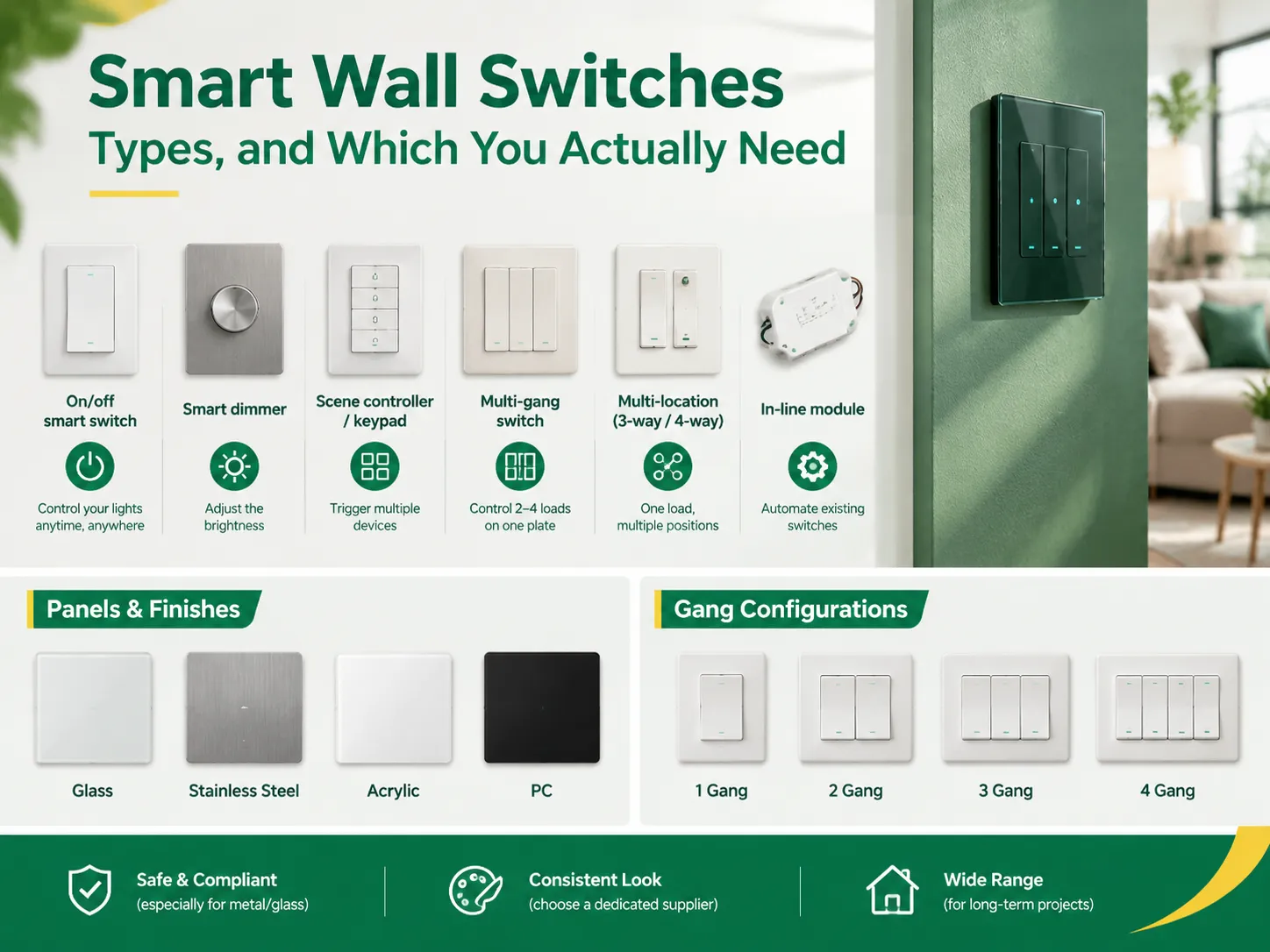
| Type | What it does | Prix typique | Watch out for |
|---|---|---|---|
| On/off smart switch | Switches a load under app, voice or schedule control | $20–$45 | Works with any lamp — the safe default |
| Smart dimmer | Adds level control | $35–$65 | Requires dimmable LEDs; non-dimmable lamps buzz or flicker |
| Scene controller / keypad | Triggers scenes across multiple devices | $45–$90 | Needs a hub; does not switch a load itself |
| Multi-gang switch | Two to four loads on one plate | Scales with gangs | Requires gang-compatible switches and a deeper box |
| Multi-location (3-way / 4-way) | One load controlled from two or more positions | Switch plus accessory | Both ends must be from the same brand and protocol |
| In-line module | Automates an existing switch behind the plate | $15–$35 | Box must have room behind the existing device |
Compared to the past, multi-location technology has advanced significantly. Most recent systems now allow for the pairing of smart switches with mechanical 3-way switches or wireless devices rather than the two smart units arrangement, thus eliminating the complex wire run between the locations. Refer to the manufacturer’s instructions for any particular device, and avoid assumption of interchangeability between different technology brands within a 3-way system, as this usually does not work.
The technical side of things being settled, the design side will make sure that households will use the system on the way of wall switches turned into a design category as opposed to being an electrical product.
For contractors, the best sourcing of parts is suppliers creating the plates and modules themselves as opposed to retailers selling their assemblies, because the uniform finishing of switches is a technical rather than purchasing matter. The options in glass, acrylic, stainless steel and PC are set out in this range of OEM wall switch and socket modules available in stainless steel, PC, acrylic and glass.
The smart switch has a rated power limit usually called the maximum load and in most cases that limit is lower than that of a mechanical switch due to the presence of electronics in the switch box to dissipate generated heat.
Whenever a product connects through a mains voltage system, it must possess an appropriate standard safety listing for a corresponding market. In the USA, it means having either UL or ETL marking; in Europe and the UK, products are certified with CE and UKCA sign; in Australia marked with SAA standard and similar certifications worldwide. In addition to the safety standard, if a product provides Matter support, it should carry a special Matter certification mark on it.
Products sold in foreign marketplaces and not carrying mandatory certification for mains voltage switches are usually cheaper compared to certified products for a reason, and the risk of invalidating home insurance with their installation in case of the fire is one of the important factors to consider.
The cost of the switch is just a component of it. The costs of hubs and coordinating nodes can alter the entire analysis significantly which is the reason why the cheapest protocol per device may not be the cheapest network.
| La lumière se connecte soit à son propre réseau Wi-Fi spécifique, soit à un réseau Zigbee/BLE. Un signal est envoyé de l'application au pilote numérique à l'intérieur de l'ampoule afin d'ajuster sa luminosité. Ainsi, tout ce que vous avez à faire est d'allumer votre interrupteur et de contrôler le niveau de luminosité depuis votre téléphone. | Coordinator / hub | Per device | 30-device total |
|---|---|---|---|
| Matter sur Thread | ~$30 border router | ~$25 | ~$780 |
| Zigbee | ~$25 USB stick | ~$12 | ~$385 |
| Z-Wave | ~$40 USB stick | ~$30 | ~$940 |
| Wi-Fi | $0, existing router | ~$20 | ~$600 |
With a cost of about 50 percent less, Zigbee ranks as the least expensive option at thirty devices, while Matter is in the middle in terms of cost but also adds superior support in terms of its ecosystem. These comparisons change significantly when one already owns a hub as is the case for most users who are simply adding to an existing system.
Most often smart lighting systems fail because the guest, child, or relative does not know how to operate it so the simplest solution is to leave a physical button with primary functions for the guest.
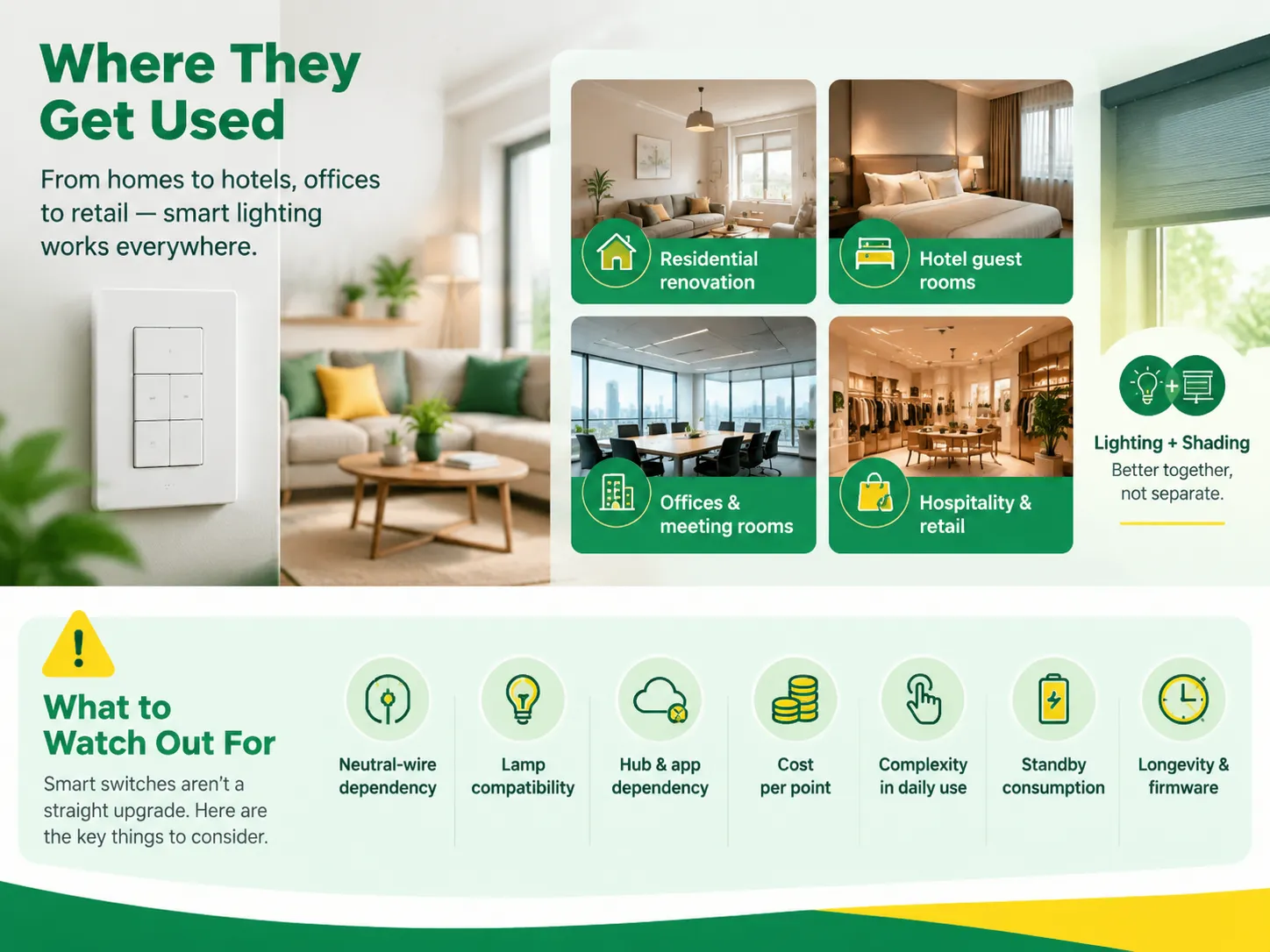
The residential sector is clearly a major market, but many of the same products provide most of the demand in the commercial sector.
When motorized shades and curtains are used in the design, make sure to coordinate the design at an early stage. That coordination, and what a complete lighting and shading system actually looks like when it is designed as one thing rather than two, is covered in this overview of smart lighting and shading solutions.
Smart switches cannot be thought of simply as an advancement of mechanical switches. In fact, the drawbacks of such a device are worth discussing.
Smart switches are hardly ever put in on their own since they share the same technology as smart sockets, which make them quite handy gadgets in the household because they can be programmed for their use to be more effective.What that category covers, including power monitoring and the differences between Wi-Fi and mesh-based sockets, is set out in this explanation of what a Wi-Fi smart socket is and how it differs from a mesh device. Deciding the protocol once at the start and applying it to switches, sockets, sensors and shades together is what keeps a house from ending up with three apps and two hubs.
Matter over Thread switches are the best option when it comes to setting up a new installation in 2026 because they are compatible with all major ecosystems like Apple Home, Google Home, Alexa, and SmartThings without the need for a proprietary shop installation. If you are looking for value in a large installation, then Zigbee is the best option as it is much cheaper compared with the other two technologies. Z-Wave is the best choice if congestion problems arise with Wi-Fi signals or range issues occur. In summary, the best switch is the one whose protocol corresponds with your system’s protocol and whose wiring is best suited for your box.
It is not possible to name one winner because the terms of comparison are mutually exclusive. When it comes to the scope provided by the ecosystem and local autonomy, devices certified by Matter are the best option. However, in terms of price per one installation point, Zigbee performs better. With regard to dependability of performance within the problem of congested 2.4 GHz area, Z-Wave takes the lead. If we speak of easiness of installation not requiring hub, Wi-Fi is the winner. Hence, the success in all one needs to do is to determine the priorities among those issues mentioned above.
The majority of them call for a neutral wire, which is absent in many old houses. Dimmers need lamps that can be dimmed and they will create a fizzing noise or flickering without them. When taking into account the hub, they can cost four to six times more than a standard switch. A producer’s decision can render the whole cloud-driven system useless. Every gadget adds energy consumption in standby mode and its radio has a shorter lifespan than the mechanical system. All of these disadvantages are quite serious and should be evaluated against the benefits of automation you obtain.
In terms of devices, Amazon Alexa and Google Home offer the most significant support, while Apple Home is best in privacy and local processing. The most important consideration facing someone looking to install hardwired switches is protocol rather than assistant: Matter is now the most widely used protocol for new devices while Zigbee is still the biggest protocol in use today. Most real-world homes end up having two or three protocols deployed at the same time using a central device called the hub which is able to connect to all of these protocols.
Buying an automation switch for the home involves three important considerations: which protocol is best, whether or not you connect to neutral wire, and the load rating required. The choice of protocol will govern hub price, device pricing, and how long any hardware will be in use. Checking for the neutral will take less than thirty seconds after removing the existing faceplate, preventing the most common reason for switch returns. The load rating will lead to avoiding failure that is not discovered until something buzzes.
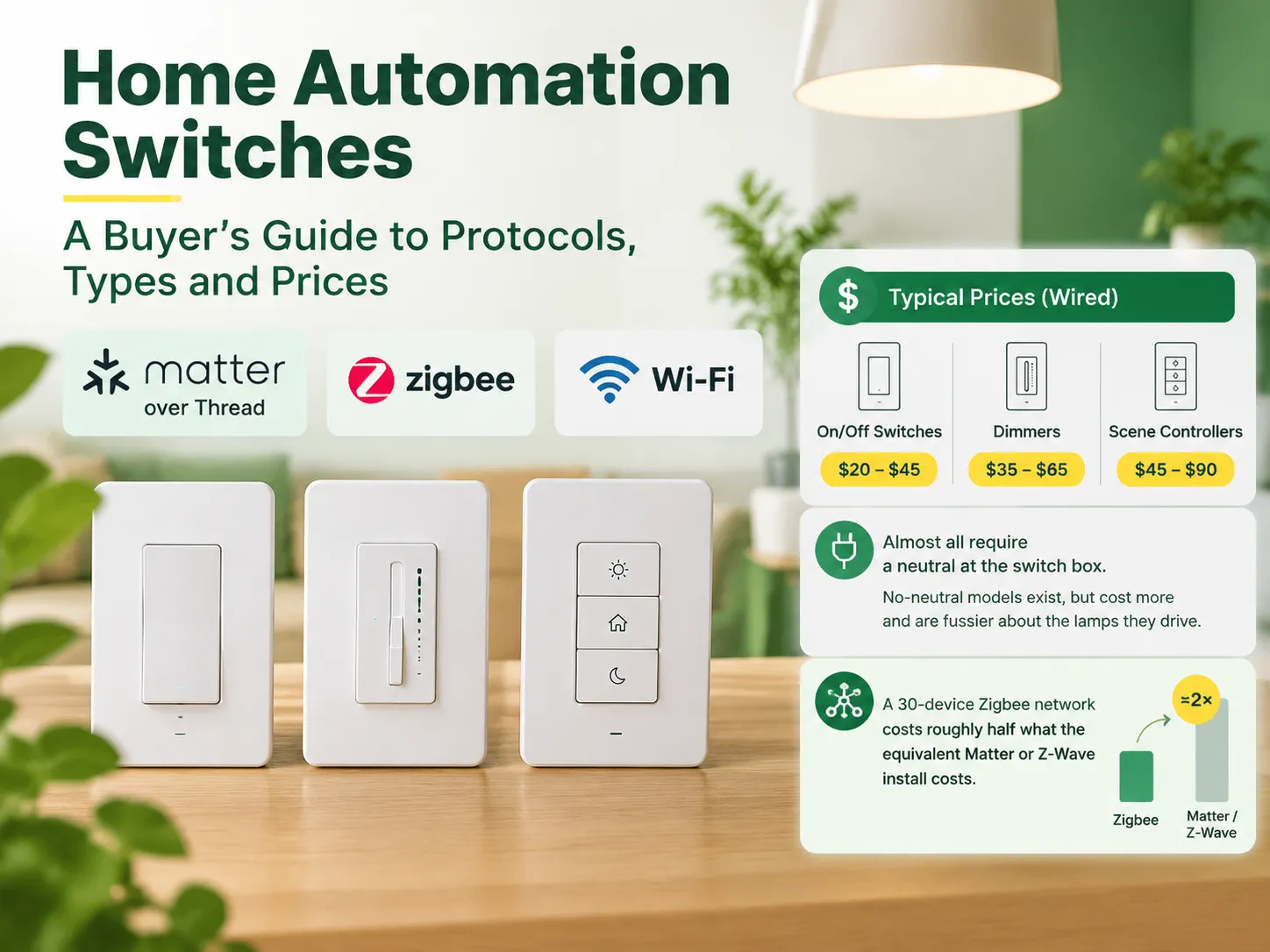
Purchasing a home automation switch is not simply purchasing a light switch. For a light switch, all you need to choose is the color and how many gangs you would like. For an automation switch, barely anything is that simple as you also have to select a protocol, a hub system, whether present wire is […]
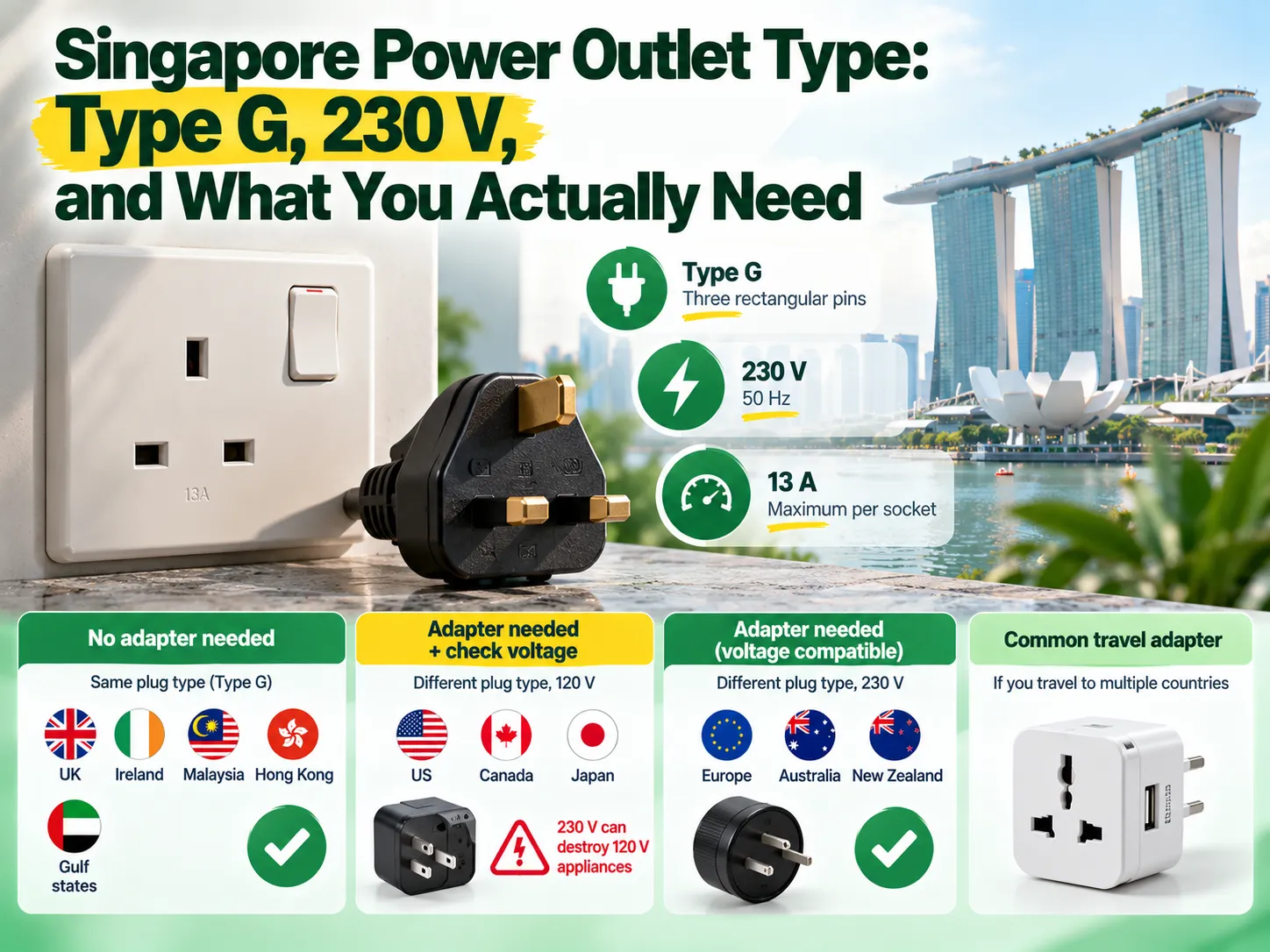
Si vous voyagez souvent, vous savez probablement que faire ses valises pour Singapour est l'une des choses les plus simples à faire en Asie, mais aussi l'une des plus difficiles car cela utilise des prises de type UK (au lieu des prises de type US). Que vous ayez besoin d'un transformateur, d'un adaptateur de prise ou des deux dépend de deux questions que les touristes […]
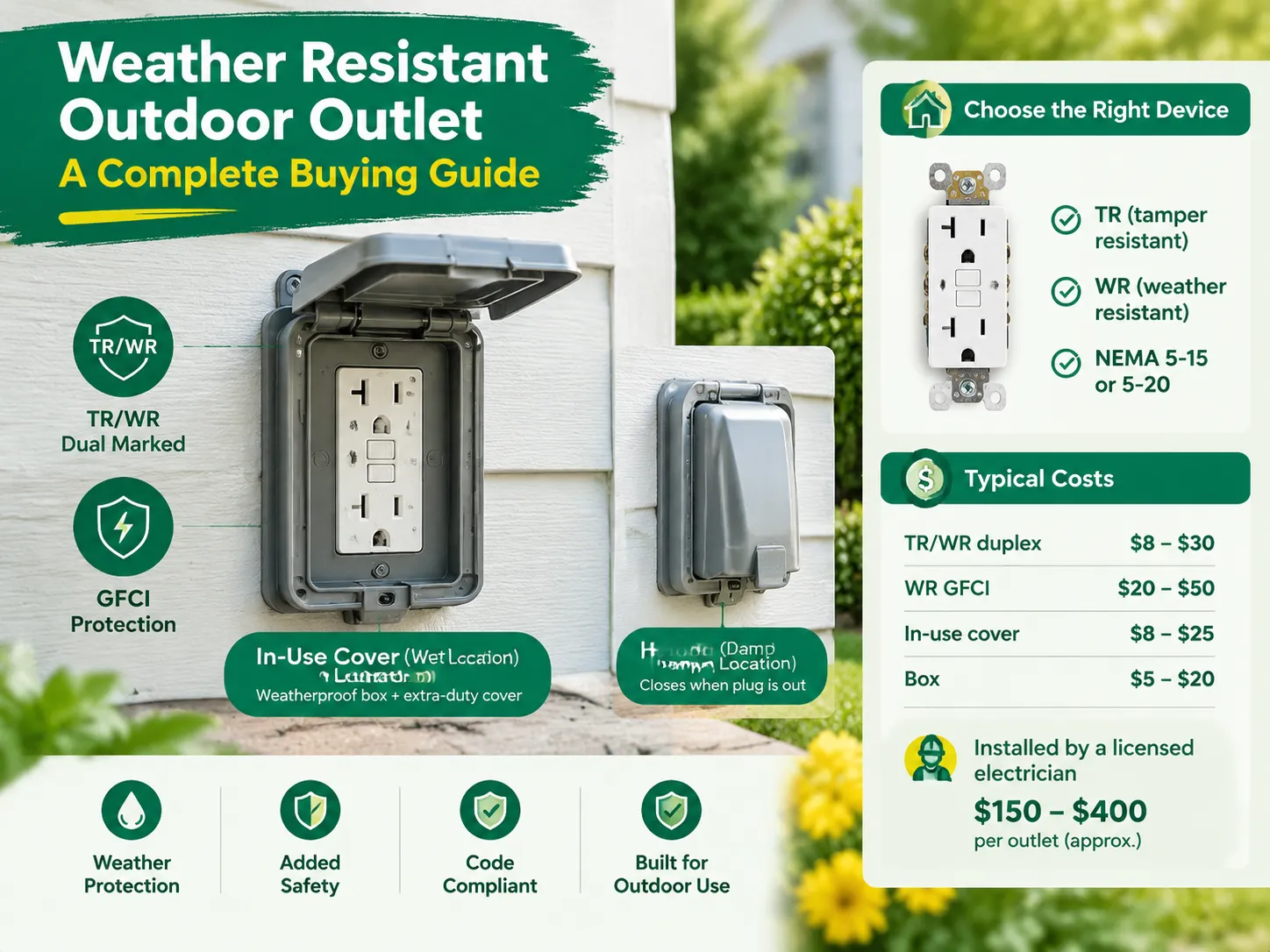
Les prises extérieures étanches ne doivent pas être confondues avec des prises extérieures ordinaires. Bien que ces prises extérieures puissent être considérées comme des prises extérieures de type WR, elles sont également dotées d'un boîtier qui assure leur étanchéité avec ou sans appareil. De plus, la fiche extérieure doit être résistante au vandalisme et inclure un RCD. Chaque prise étanche doit être identifiée […]

 No.6 Tuozhan Road, Leshang Pioneer Park, port de la baie de Yueqingwan, ville de Yueqing, province du Zhejiang


